
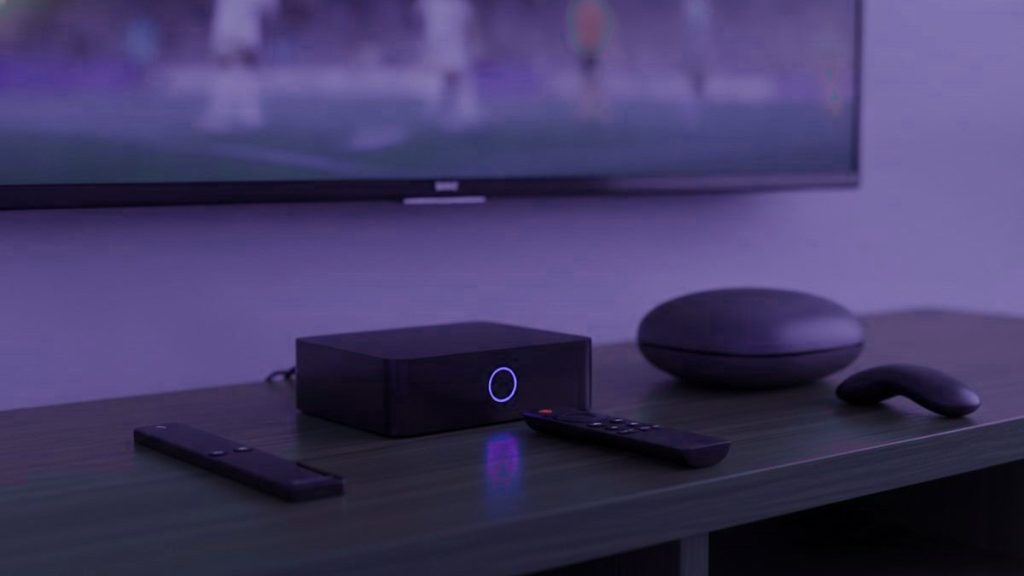
The honest truth is that most households need no IPTV box at all, and the few that do are almost always happier when a $40 stick does the job instead of a $180 dedicated unit. Before spending a cent, look around the room: a smart TV bought any time from 2016 on, a streaming stick you already have, or a laptop will have you watching tonight for free — which is rather the point of collapsing the whole paid-TV stack onto a screen you already own.
Start here
Begin with the hardware already in the house. If you genuinely need to buy, a $30-to-$50 Fire TV Stick 4K is enough for nearly everybody. Reach past that only for a main television that gets used every day, or if you specifically want a remote and a guide that feel like an old-fashioned set-top box.
First, take stock of what’s already in the room
- A Samsung or LG set from 2016 or later. Each runs a player straight from its own app store. No extra gadget required.
- A Fire TV Stick or Android TV device you already own. It is ready to go — it only needs a player app added.
- A phone, tablet or laptop. Perfect for kicking the tyres before you commit to anything at all.
- An Apple TV. It will run IPTV Smarters Player, downloaded straight from the tvOS store.
Grab the trial on whatever hardware you already have. Prove the service is worth keeping first, and only then decide what to run it on — not the other way around. There is no sense buying a box to replace your cable rental before you know the subscription itself is a keeper.
The line-up
| Device | Price | TiviMate? | Verdict |
|---|---|---|---|
| Fire TV Stick 4K / Max | $30 – $50 | Yes, sideloaded | The right call for the vast majority of homes |
| Chromecast with Google TV | $40 – $50 | Yes, from Play Store | Tidier setup, nothing to sideload |
| Generic Android box | $40 – $90 | Usually | Hit and miss. Insist on 2 GB RAM or more |
| Nvidia Shield | $150 – $200 | Yes | The most powerful there is. More than most people need |
| Formuler Z11 | $140 – $180 | Yes, plus MyTVOnline | The choice for enthusiasts |
| MAG 5xx | $120 – $160 | No, portal-based | Uncomplicated, dependable, cable-box feel |
| Roku | $30 – $100 | No | Steer clear of it for IPTV |
Why the Fire TV Stick is the best value
It costs less than a single month of cable, plays 4K without breaking a sweat, and Amazon cuts the price hard several times a year. The Fire TV Stick 4K Max is the pick of the pair on value. Its one quirk: TiviMate is not stocked in Amazon’s store, so you load it in yourself through Downloader — a five-minute job, and our Firestick guide names every menu you pass on the way.
Give the cheaper non-4K Lite a miss unless money is genuinely tight: it tops out at 1080p, which rather undoes the reason you are paying for Ultra HD feeds in the first place.
What the pricier boxes are really buying you
The remote. Real, purpose-made buttons for the channel list, the guide and your favourites, rather than a repurposed streaming clicker. On a set you watch every day, that counts for more than any line on a spec sheet.
Nothing to sideload, ever. A MAG runs off a portal bound to the box itself, so there is nothing to install and nothing to keep updating.
A snappier guide. Dedicated hardware paints a long channel list noticeably faster than a stick grinding through the same task.
Set against all that: three to five times what a stick costs. Money well spent in the living room, poor value in a spare bedroom. Both are walked through in our MAG and Formuler setup guide.
Why Roku is a poor fit for IPTV
Roku kit is genuinely great for mainstream streaming, so the assumption is understandable — but it allows no sideloading, and its store carries hardly any of the well-known players. TiviMate is missing altogether. What is left is a thin handful of options plus screen mirroring, which works but makes for a frustrating day-to-day experience. Already own one? Our Roku guide runs through the two approaches that actually work. Shopping fresh? Buy something else.
Shopping for a generic Android box
- 2 GB of RAM at the very least, 4 for preference. Any lower and long channel lists grind to a crawl.
- Proper certified Android TV, not a repackaged phone build, so the Play Store actually serves up the TV versions of apps.
- An Ethernet socket. A wired link beats Wi-Fi for live streams every single time.
- A brand with a name. Unbranded boxes all too often arrive running tampered firmware from who-knows-where.
- Pay no attention to core counts. Eight sluggish cores lose to four quick ones, and the listings routinely fudge this figure.
The upgrade that outdoes every box
When buffering is the gripe, more hardware is usually the wrong buy. A $12 Ethernet adapter cures more streaming trouble than any box, because most of the stuttering is a network problem, not a shortage of processing muscle. Wi-Fi at nine at night, in a room a good distance from the router, with the entire street streaming at once, is exactly where live television comes apart. Try the cable before dropping $180 on a box that hits the same wall.
What we’d actually buy
To begin with, nothing. Test on the gear you already own. After that, a Fire TV Stick 4K, with an Ethernet adapter alongside it if the set is old or slow — around $50 all in, and it clears up the overwhelming majority of cases. A Formuler or a MAG only for a main television that earns its keep every day.
Every one of them works with a Nixaiptv account, which arrives as a standard Xtream Codes login — one set of details in place of the tangle of separate boxes and subscriptions you paid for before. Instructions for each device live in the setup hub, and the numbers are on the pricing page.
Frequently asked questions
What is the best IPTV box in 2026?
For most people, the Amazon Fire TV Stick 4K Max at about $60: it runs every IPTV app, handles 4K and is easy to set up. For daily viewers who want a purpose-built player and remote, the Formuler Z11 Pro Max at about $190. For the fastest Android TV hardware, the Nvidia Shield TV Pro at about $200.
What's the best IPTV box to buy on a budget?
The Walmart onn. 4K Pro at about $50. It has an Ethernet port, 3 GB of RAM, a Play Store so TiviMate installs without sideloading, and it handled 4K IPTV feeds in our tests. The Fire TV Stick 4K Max is the alternative if you prefer Fire OS or cannot buy from Walmart.
How much does an IPTV box cost?
From about $50 for an onn. 4K Pro or $60 for a Fire TV Stick 4K Max, through $80 to $100 for a MAG 324, BuzzTV or Google TV Streamer, to $190 to $200 for a Formuler Z11 Pro Max or Nvidia Shield TV Pro. The subscription that supplies the channels is separate, from $15 a month or about $6 a month on a yearly plan.
Is the Formuler Z11 Pro Max worth it?
If you watch IPTV every day, yes. Its built-in MyTVOnline 5 player, dedicated remote buttons, 4 GB of RAM and gigabit Ethernet make it the smoothest dedicated IPTV box we have used. If you watch a few evenings a week, a Fire TV Stick 4K Max gives most of the experience for a third of the price.
Do I need a box at all for IPTV?
No. A Samsung or LG smart TV made after 2016, an Android TV, an Apple TV, a phone or a PC all run IPTV apps directly. A box is worth adding when the TV is older, when you want TiviMate on a non-Android TV, or when you want Ethernet and a better remote.
Should I buy a fully loaded IPTV box?
No. Boxes sold with IPTV apps and a lifetime subscription pre-installed usually stop working within weeks, often run modified apps, and some have shipped with malware. Buy a clean device from a normal retailer, install the apps yourself and add a subscription from a provider with a website, trial and refund policy.
One plan, all 25,000+ channels?
Send one WhatsApp message, pay, and your login lands under 15 minutes. Every plan is backed by the 7-day money-back window.
Related articles
How Much You Really Save by Switching to IPTV in 2026
Quick answer: Your saving depends on what you pay now, but the method is simple: add up your cable and every streaming…
October 15, 2026Do You Still Need Streaming Apps If You Have IPTV?
Quick answer: For most people, IPTV removes the need for several streaming apps but not necessarily every one. Nixaiptv covers live TV,…
October 15, 2026YouTube TV and Fubo vs IPTV in 2026
Quick answer: YouTube TV and Fubo are live-TV streaming services built around a fixed bundle of US channels with cloud DVR. IPTV…